Table of Contents
- Digital Business Cards Made Simple: How vCard QR Codes Make Sharing Contact Details Easier
- What Is a vCard QR Code?
- Why Traditional Business Cards Are Not Always Enough
- How a vCard QR Code Changes the Networking Experience
- What Information Can You Include in a Digital Business Card?
- A vCard QR Code Can Strengthen Your Professional First Impression
- Digital Business Cards Are Useful Beyond Printed Cards
- Why This Matters at Networking Events
- A Better Option for Sales Professionals
- Freelancers and Independent Professionals Can Benefit Too
- Your Email Signature Can Become More Useful
- A Digital Business Card Can Carry Your Brand
- Digital Does Not Mean You Have to Abandon Physical Business Cards
- How to Create a vCard QR Code
- Keep Your Digital Contact Profile Up to Date
- vCard QR Codes and Professional Networking in a Digital-First World
- Common Mistakes to Avoid When Using a vCard QR Code
- Why vCard QR Codes Are Useful for Modern Businesses
- The Future of Business Cards Is More Connected
- Final Thoughts
Digital Business Cards Made Simple: How vCard QR Codes Make Sharing Contact Details Easier
Business networking has changed significantly over the years. A traditional business card used to be one of the simplest ways to introduce yourself, share your contact information, and make sure a new connection could reach you later.
However, the way people communicate today is much more digital. Phone numbers, email addresses, websites, social media profiles, WhatsApp, LinkedIn accounts, and professional information are often spread across several different places, which can make a simple exchange of contact details surprisingly inconvenient.
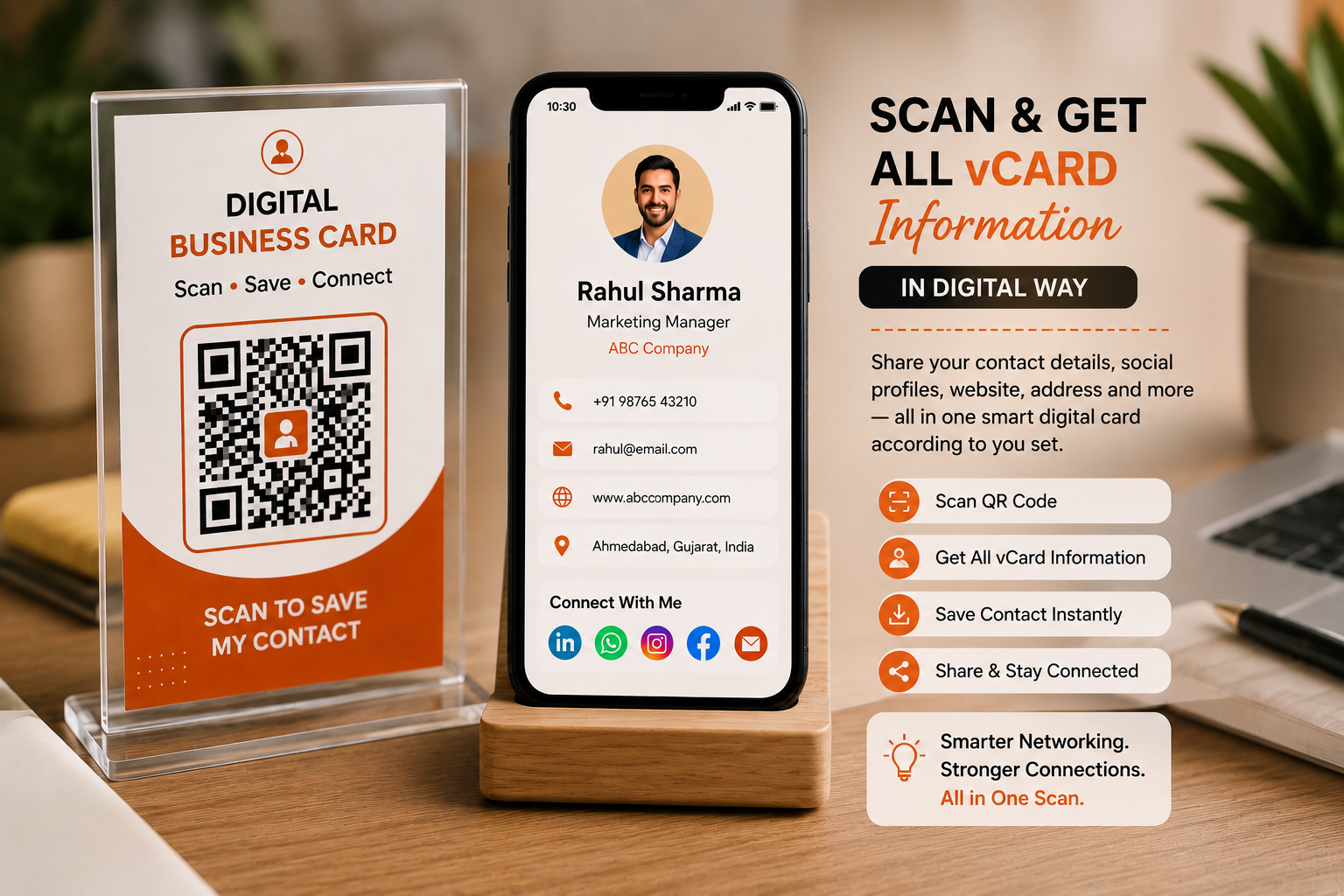
This is where a vCard QR code offers a more practical approach. Instead of handing someone a card filled with information and expecting them to type everything manually into their phone, a person can scan one QR code and access a complete digital contact profile.
The vCard QR solution available through Spur QR is designed around this idea, allowing users to create a digital business card containing information such as name, company, position, phone number, email, website, address, profile photo, and social links.
What Is a vCard QR Code?
A vCard QR code is a QR code connected to digital contact information. The term “vCard” refers to a standard format for storing and exchanging contact details, while the QR code provides a simple way for someone to access that information using a smartphone.
Instead of asking a person to type a name, mobile number, email address, company name, website, and other details manually, the QR code creates a much quicker digital connection.
A vCard QR code can be particularly useful when meeting someone for the first time because the contact exchange can happen in seconds rather than requiring a person to find a pen, enter information into their phone, or later search through a collection of physical business cards.
Spur QR's vCard creator allows users to enter personal information, company information, contact details, address, description, profile photo, and multiple social links before generating the digital card.
The bigger idea behind a vCard QR code is not simply replacing paper with a QR pattern. It is about making professional identity easier to share in a world where communication is increasingly digital. A traditional business card has limited physical space, which means people usually have to choose only a few pieces of information to display.
A digital contact profile can provide a much broader picture without making the physical card crowded. Someone can scan the QR code and access contact information along with a website, professional social profiles, company information, and other relevant details. This makes the digital card useful not only for exchanging a phone number but also for creating a more complete first impression.
Why Traditional Business Cards Are Not Always Enough
Traditional business cards are still useful, especially during face-to-face meetings, conferences, sales visits, exhibitions, and networking events. The problem is that a physical card depends on the other person taking an additional step after receiving it.
They may need to type the phone number into their contacts, enter the email address, save the website, search for the person's LinkedIn profile, or manually follow the social accounts mentioned on the card. When someone attends a busy event and collects several cards, these small tasks can quickly become frustrating.
Some cards may be misplaced, while others may remain inside a wallet or drawer without ever being entered into a phone.
There is also another problem: information can change. A person may move to another company, change their job title, update their phone number, launch a new website, or start using a different social media profile. A printed card cannot update itself.
Once thousands of cards have been printed, the information on them remains exactly the same. This makes traditional cards less flexible for professionals whose roles and contact details change over time.
A digital business card can address this limitation by providing a contact profile that can be updated when necessary, allowing the shared digital experience to remain more current. Spur QR specifically describes its vCard solution as a way to update contact details without reprinting the physical card.
How a vCard QR Code Changes the Networking Experience
Imagine attending a business conference and meeting a potential client. You introduce yourself, explain what your company does, and exchange contact details. With a traditional business card, you hand over a printed card and the other person needs to manually save the information later.
With a vCard QR code, the physical card can still be present, but the QR code provides an immediate digital option. The other person scans it, opens the digital profile, and can save the relevant information to their phone. The interaction becomes faster and more convenient without requiring the person to type every detail.
This can make a noticeable difference during situations where many people are exchanging information. At exhibitions, trade shows, conferences, networking meetings, sales visits, and professional events, people often have only a short amount of time to introduce themselves.
A digital contact card can make that short interaction more useful by giving the other person an easy way to access the information immediately. Spur QR's vCard page specifically highlights business cards, networking events, email signatures, sales professionals, and freelancers as practical use cases for digital business cards.
What Information Can You Include in a Digital Business Card?
One of the strongest advantages of a vCard QR code is the amount of information that can be organized into one digital profile. A printed business card might contain a person's name, job title, company, phone number, email, and website, but a digital profile can provide additional ways for people to connect.
Spur QR's vCard creator includes fields for full name, website, company name, position, mobile number, email, work phone, fax, address, personal description, profile photo, and multiple social platforms.
A professional digital contact profile can include:
- Name, designation, company, phone number, email, website, address, profile image, and professional description
- LinkedIn, WhatsApp, Instagram, Facebook, YouTube, X, Snapchat, and other relevant social or communication links
This creates a more complete digital identity while keeping the physical business card clean and professional.
A vCard QR Code Can Strengthen Your Professional First Impression
A business card is often one of the first physical representations of a professional or company. The design, information, typography, and overall presentation can influence how someone remembers that interaction.
A digital business card adds another layer to that first impression. Instead of simply seeing a printed name and number, the recipient can access a structured profile that introduces the person or company in a more complete way.
This is especially useful for professionals who rely heavily on networking. Sales executives, consultants, entrepreneurs, freelancers, recruiters, designers, real estate professionals, business owners, agency representatives, and many other professionals regularly need to introduce themselves to new people.
A digital business card can give these professionals a more flexible way to present themselves while keeping the contact-sharing process simple.
Digital Business Cards Are Useful Beyond Printed Cards
A common misconception is that a vCard QR code is useful only when printed on a business card. In reality, the digital profile can be shared through many different channels.
A QR code can be placed on presentation slides, event banners, brochures, office signage, promotional material, email signatures, exhibition displays, or other professional assets.
The same concept can also work in a digital environment where a person wants to provide a quick path to their contact information.
For example, a salesperson presenting to a potential client could include a vCard QR code at the end of a presentation. A freelancer could add it to a portfolio.
A company representative at a trade show could display it at their booth. A professional could include it in an email signature so recipients can quickly save their contact information.
The physical or digital placement changes, but the objective remains the same: make it easy for another person to access and save professional contact details.
Why This Matters at Networking Events
Networking events are one of the strongest environments for digital business cards because they involve many short conversations and repeated exchanges of information.
A person might meet ten, twenty, or even more professionals during one event. If every contact requires manually entering information, the process becomes time-consuming. Physical cards also have a tendency to get mixed together after the event.
A vCard QR code can simplify the exchange by creating a consistent digital method. Instead of focusing on writing down contact information or remembering which card belonged to which conversation, attendees can scan and save information during or immediately after the conversation. This reduces the friction involved in networking and gives people a better chance of preserving the connection while the interaction is still fresh.
A Better Option for Sales Professionals
Sales professionals are constantly exchanging contact details with prospects, customers, distributors, partners, and business owners. A sales representative may visit multiple companies in one day and hand out numerous business cards. If their phone number, designation, company website, or other information changes, old printed cards can become outdated.
A digital business card offers more flexibility because the professional profile can be managed digitally. Spur QR's vCard solution includes company name, position, contact details, website, address, description, and social profiles, allowing sales professionals to provide a more complete contact profile instead of relying on a single phone number and email address.
For sales teams, this can also create greater consistency. Instead of every employee creating a completely different style of digital profile, the organization can establish a professional approach to how contact information is presented.
This can help maintain a consistent brand experience across meetings, events, presentations, and customer interactions.
Freelancers and Independent Professionals Can Benefit Too
Freelancers often work across multiple channels. They may communicate through email, WhatsApp, LinkedIn, Instagram, a personal website, or portfolio platforms. A traditional business card cannot always provide enough room for all of these channels without becoming crowded.
A vCard QR code gives freelancers a way to connect all relevant information through one digital profile.
Consider a graphic designer meeting a potential client at a local business event. Instead of handing over a card containing only a phone number and email address, the designer can provide a QR code that connects the client to contact information, portfolio links, social profiles, and professional details.
The interaction becomes more than a basic exchange of numbers; it becomes an opportunity to introduce the freelancer's wider digital presence.
Your Email Signature Can Become More Useful
Email signatures are another interesting use case for vCard QR codes. Most professional emails already contain a person's name, designation, company, phone number, and website. However, recipients may still need to manually save those details. Adding a vCard QR code creates an additional option for people who want to save the contact information quickly.
This can be particularly useful when communicating with new clients or partners who may receive emails from several people within the same organization.
A QR code can provide a simple way to move the information from the email environment into the recipient's phone contacts. Spur QR specifically lists email signatures among the popular use cases for its digital business card QR codes.
A Digital Business Card Can Carry Your Brand
A contact profile does not need to look like a plain database entry. Branding can play an important role in making the digital card recognizable. Spur QR allows users to customize elements of the QR design, including dot patterns, corner styles, foreground and background colors, gradients, and logos.
Its vCard creation process also includes options for choosing card fonts and accent colors.
This means a company or professional can create a digital contact experience that feels connected to their existing visual identity. Brand colors, logos, typography, and professional imagery can help make the profile feel more intentional. However, design should always support usability.
A QR code needs sufficient contrast and clarity so that visual customization does not interfere with scanning. Spur QR recommends testing customized QR codes across devices before distributing them at scale.
Digital Does Not Mean You Have to Abandon Physical Business Cards
There is no need to think of digital business cards and physical business cards as competing choices. In many professional situations, the best approach can be to use both.
A physical card can provide a familiar and tangible introduction, while the QR code gives the recipient a quick path to the digital profile. This combination keeps the traditional networking experience while adding the convenience of modern technology.
For example, a printed business card can contain the person's basic information and a clearly positioned vCard QR code. Someone who prefers physical cards can keep it, while someone who wants to save the contact digitally can scan the code. This gives the recipient a choice without forcing one particular method of networking.
How to Create a vCard QR Code
Creating a digital business card does not have to be complicated. The basic process involves entering the information that you want to share, selecting an appropriate card design, adding relevant social links, customizing the visual appearance, and generating the QR code.
Spur QR's current vCard workflow follows a straightforward sequence: choose a template, enter vCard information, generate the digital card, customize the QR design, and download the result for sharing or printing.
Before creating the final version, it is worth considering which information is genuinely useful to the people you meet. A digital profile can contain more information than a traditional card, but that does not mean every possible field needs to be filled.
The goal is to create a profile that makes it easy for someone to understand who you are, what you do, and how they can contact you.
Keep Your Digital Contact Profile Up to Date
One of the biggest advantages of a digital business card is flexibility, but that advantage only matters if the profile is maintained. If a phone number changes, a new company website launches, a LinkedIn profile is updated, or a professional changes roles, the digital card should reflect those changes. An outdated digital profile can create the same problems as an outdated printed business card.
This is particularly important for professionals who print their QR codes on materials that may remain in circulation for months. A business card might be distributed today and scanned several months later.
A digital profile gives the business or professional an opportunity to keep the shared information current rather than relying entirely on information that was correct when the card was printed.
vCard QR Codes and Professional Networking in a Digital-First World
Professional networking is increasingly happening across a mixture of physical and digital environments. People meet in offices, conferences, exhibitions, workshops, restaurants, coworking spaces, business meetings, and online events.
They then continue those relationships through email, messaging applications, social networks, websites, and video calls. A digital business card fits naturally into this mixed environment because it connects a real-world introduction with the digital communication that usually follows.
This is why a vCard QR code should not be viewed simply as a replacement for paper. It can be viewed as a connection tool. The QR code creates the entry point, while the digital profile provides the information needed to continue the relationship.
Common Mistakes to Avoid When Using a vCard QR Code
A digital business card is simple to create, but a few practical considerations can make the difference between a useful experience and a frustrating one. First, the QR code should be large enough and clear enough to scan comfortably. Second, it should have enough contrast against its background.
Third, the call-to-action should tell people what the QR code does, such as “Scan to Save My Contact.” Fourth, the digital profile should be mobile-friendly because most people will access it from a smartphone. Finally, all important information should be tested before the QR code is printed on a large quantity of material.
It is also important not to overload the profile with unnecessary information. A digital business card should make contact sharing easier, not turn a simple introduction into a complicated website.
The best profiles are focused, professional, easy to navigate, and designed around the needs of the person receiving the information.
Why vCard QR Codes Are Useful for Modern Businesses
For businesses, contact sharing is often the beginning of a longer relationship. A person might first meet a sales representative, then communicate through email, visit the company website, connect on LinkedIn, request a quotation, or schedule a meeting.
If the initial contact information is difficult to save, the relationship can lose momentum. A vCard QR code removes some of that friction by making professional contact information easier to access.
It can also help businesses present a more modern image. When a representative offers a digital contact card instead of relying solely on paper, it communicates that the company is comfortable using digital tools to make communication easier.
This may be particularly valuable for technology companies, startups, consultants, agencies, real estate firms, service providers, sales organizations, and other businesses where networking plays an important role.
The Future of Business Cards Is More Connected
Business cards are unlikely to disappear simply because digital tools exist. Face-to-face interactions still matter, and physical materials can play an important role in professional networking.
What is changing is how those physical interactions connect with digital experiences. A modern business card does not have to end with printed contact information. It can become a doorway to a complete digital profile.
A vCard QR code represents this shift in a simple way. Instead of forcing a recipient to manually transfer information from paper into a phone, the QR code gives them a faster route to the digital profile. Instead of limiting a professional to a few lines of printed information, the digital card can provide a broader collection of relevant details. And instead of treating a printed card as permanently fixed, businesses can use a managed digital profile that can remain current.
Final Thoughts
The traditional business card solved a simple problem: how to give someone your contact information when you meet them. A vCard QR code solves the same problem in a way that fits more naturally into modern communication. It reduces manual typing, brings contact information together in one place, supports social and professional links, and gives people a convenient way to move from a face-to-face introduction to a digital connection.
For professionals who attend networking events, sales meetings, conferences, exhibitions, or client appointments, this can make everyday contact sharing easier. For freelancers and entrepreneurs, it can provide a compact way to present a wider professional identity.
For businesses, it can help create a consistent and modern contact-sharing experience across teams and marketing materials. Spur QR's vCard tool supports contact details, company information, websites, addresses, profile images, and multiple social links, while also providing QR customization options for branding.
The real value of a digital business card is not that it removes paper. It is that it removes unnecessary effort. A person should not have to type a phone number, search for a website, manually enter an email address, and then look up social profiles just because they met someone for two minutes.
A single scan can provide a much simpler path. As professional communication continues to move between physical meetings and digital platforms, tools such as vCard QR codes can help make that transition smoother.
A business card may be small, but the connection behind it can be valuable. With a well-designed vCard QR code, that small physical introduction can become a complete digital contact experience—one that is easier to share, easier to access, easier to update, and better suited to the way professionals communicate today.