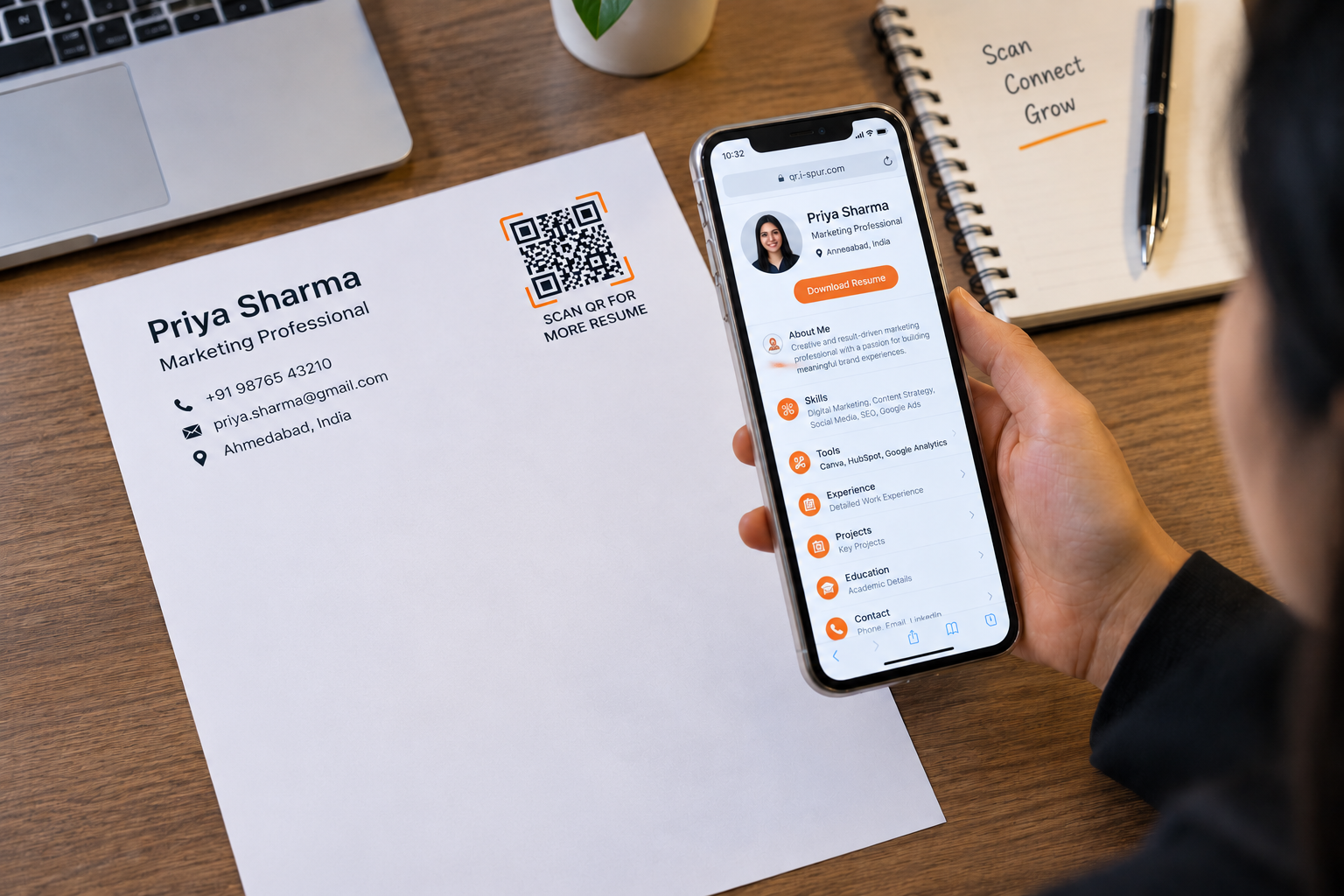
Resume QR Code: Turn Your CV Into a Digital Professional Profile
A resume is often the first introduction between a job seeker and a recruiter, but a traditional CV can only show a limited amount of information on a printed page. A Resume QR Code adds a simple digital layer to that experience, allowing recruiters, employers, or professional contacts to scan a code and instantly access a candidate’s resume details. Instead of relying only on printed pages, candidates can use a QR code to connect their physical CV, business card, or networking material with a digital professional profile. The Spur QR Resume Generator is designed for this purpose, allowing users to enter their name, professional role, location, skills, tools, and experience before generating a scannable QR code.
What Is a Resume QR Code?
A Resume QR Code is a scannable code that connects a printed resume or professional material with digital resume information. When someone scans the code using a smartphone, they can view the professional information associated with it without manually searching for the candidate online. This can be particularly useful when a recruiter receives several resumes and wants a quick way to explore additional information about a candidate.
A Resume QR Code can contain important professional details such as your name, role or profession, city, country, primary skills, secondary skills, tools, and experience. Spur QR's Resume generator provides dedicated fields for these details, making it possible to build a concise digital professional profile and then generate a QR code for sharing.
Why Add a QR Code to Your Resume?
The main advantage of adding a QR code to a CV is that it creates a bridge between printed information and digital information. Your printed resume can introduce your education, experience, and skills, while the QR code gives the reader another convenient way to access your professional profile. This can be useful when attending career fairs, interviews, networking events, placement drives, or professional meetings where people exchange resumes quickly.
For students and fresh graduates, this can also provide a practical way to highlight skills, tools, projects, and experience without making the printed CV unnecessarily crowded. For experienced professionals, the QR code can provide an additional digital touchpoint alongside a traditional resume or business card.
What Can You Share Through a Resume QR Code?
A professional profile needs more than just a person's name. It should quickly communicate what the person does and what they can offer. A Resume QR Code can help organize this information into a digital format.
Some useful information includes:
- Professional identity: Name, role or profession, city, and country.
- Career information: Primary skills, secondary skills, tools, and experience details.
This makes the QR code useful beyond a simple contact shortcut. It can become a compact digital introduction that helps a recruiter understand a candidate before moving to the next stage of the hiring process.
Where Can You Use a Resume QR Code?
A Resume QR Code does not have to be limited to the first page of a CV. It can be placed anywhere professional information is exchanged. Spur QR specifically highlights printed CVs, business cards, networking events, and job applications as relevant use cases.
For example, students can place their QR code on placement resumes, project reports, internship applications, or career-fair materials. Professionals can add one to business cards, printed portfolios, conference materials, or networking documents. The idea is simple: wherever someone sees your professional identity, the QR code can provide a quick path to additional information.
Static or Dynamic Resume QR Code?
When creating a Resume QR Code, users may have a choice between static and dynamic QR options. A static QR code keeps its information fixed after creation, while a dynamic QR code can allow the connected information to be updated without replacing the printed QR code. Spur QR describes dynamic QR codes as editable and trackable, with features such as destination updates and scan analytics.
For a resume that is printed once for a specific application, a static QR code may be sufficient. If a professional expects their profile or linked information to change over time, a dynamic QR code can provide more flexibility.
Create Your Resume QR Code
Creating a Resume QR Code can be straightforward. Start by entering your full name, professional role, city, and country. Then add your primary and secondary skills, the tools you work with, and your experience information. After entering the required details, generate the QR code and customize its appearance with colors, patterns, corner styles, or a logo. Spur QR also provides downloadable QR options for sharing and printing.
The important thing is to keep the information clear and professional. A QR code should support your resume rather than replace the important information recruiters need to see immediately. A strong printed CV combined with a well-organized digital profile can make the overall application easier to explore.
Make Your Resume More Connected
A modern job search involves more than sending a document. Candidates share resumes through emails, job portals, networking events, referrals, career fairs, and direct applications. A Resume QR Code provides one additional way to make that professional information accessible through a simple scan.
Whether you are a student preparing for placements, a freelancer meeting potential clients, or an experienced professional attending a networking event, connecting your printed resume with a digital profile can make information sharing more convenient. With Spur QR, you can create a customized Resume QR Code containing your professional role, skills, tools, and experience, then place it on your CV or business card for quick access.
In short, a Resume QR Code turns a traditional CV into a more connected professional profile—giving recruiters and contacts a simple way to discover more about you with one scan.