Table of Contents
- Turn Every Scan Into a Direct Email Conversation
- What Is an Email QR Code?
- Why Typing an Email Address Can Become a Barrier
- How an Email QR Code Works
- The Real Value Is Reducing Friction
- Email QR Codes for Business Cards
- Email QR Codes for Customer Support
- Making Customer Feedback Easier
- QR Email for Lead Generation
- Using Pre-Filled Messages the Right Way
- Useful Places to Use an Email QR Code
- Email QR Codes for Marketing Campaigns
- Branded Email QR Codes Can Look More Professional
- Static vs Dynamic Email QR Codes
- Why Dynamic QR Codes Can Be Useful for Long-Term Campaigns
- Email QR Codes Can Connect Physical and Digital Marketing
- Making Communication More Convenient for Customers
- Best Practices for Creating an Effective Email QR Code
- Email QR Codes Can Support Different Business Departments
- Email QR Codes for Events and Exhibitions
- Email QR Codes for Small Businesses
- Turning a QR Scan Into a Real Conversation
- Final Thoughts
Turn Every Scan Into a Direct Email Conversation
Email is still one of the most useful communication channels for businesses. Customers use email to ask questions, request information, share feedback, enquire about products, contact support teams, and start conversations with companies.
The problem is not the value of email; the problem is the effort required to start an email conversation. A customer may have to remember an email address, type it correctly, open their email application, enter the subject, write a message, and then send it.
Each of these small steps creates friction, especially when the customer is interacting with a business in a physical location. This is where an Email QR Code can make the process much easier.
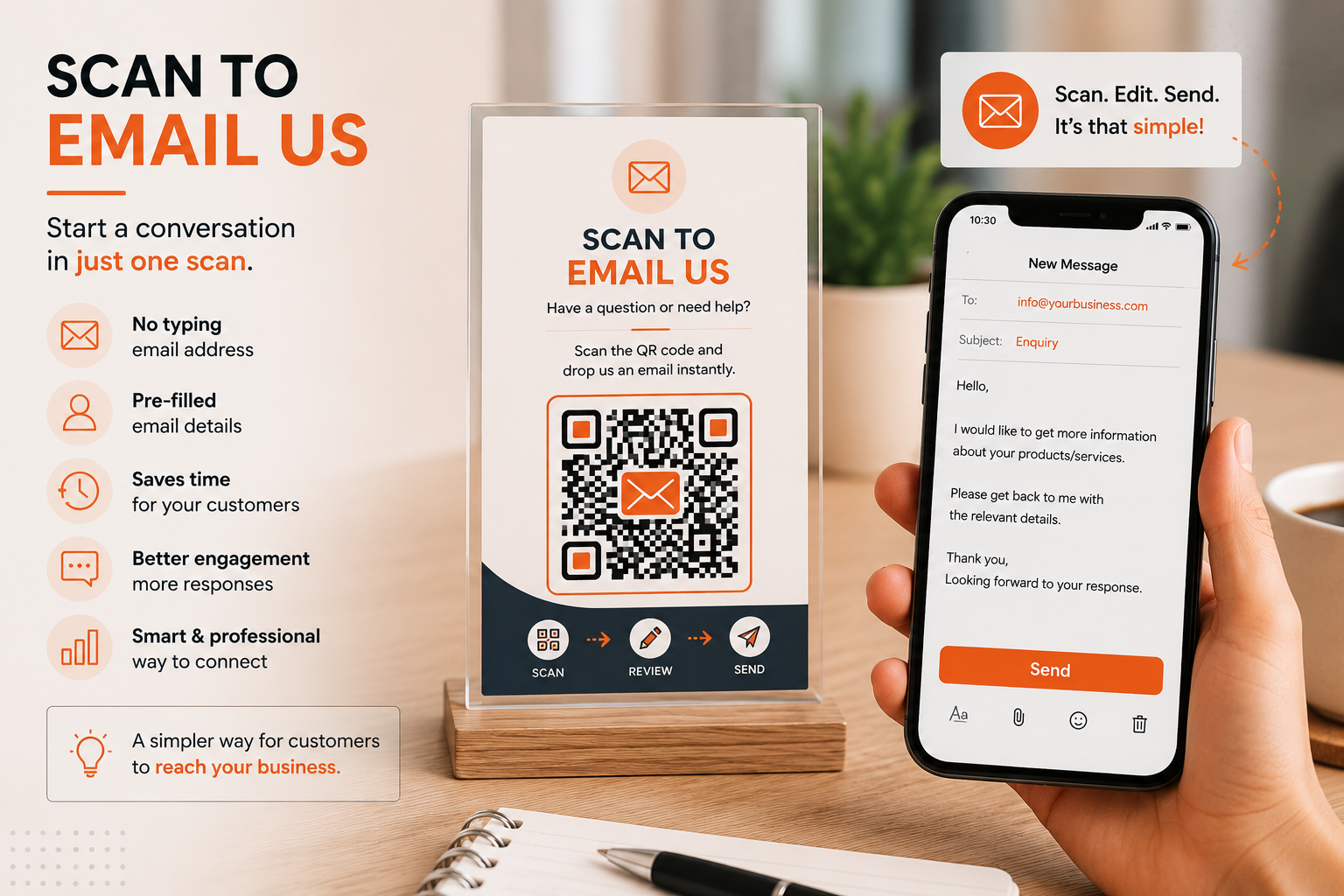
Instead of asking customers to type an email address manually, a QR code can open a pre-addressed email composition window directly on their smartphone. With the right setup, the recipient, subject line, and even a pre-filled message can already be prepared, allowing the customer to review the message and send it with minimal effort. Spur QR's Email QR Code solution is designed specifically for this purpose, allowing businesses and individuals to create QR codes that open an email with a predefined recipient, subject, and message.
What Is an Email QR Code?
An Email QR Code is a scannable QR code that helps someone start an email conversation without manually typing the recipient's email address. Instead of displaying an email address as plain text and expecting.
The customer to copy it or remember it, the QR code creates a direct connection between the physical or digital marketing material and the user's email application. When the code is scanned, the email interface can open with the intended recipient already entered.
Depending on how the QR code is configured, a subject line and message can also be pre-filled. This makes the technology particularly useful for situations where a business wants to encourage customers to send an enquiry, request support, provide feedback, contact a sales team, or start another type of email conversation.
Spur QR allows users to enter an email address and optionally add a subject and pre-filled message before generating the code.
The important thing to understand is that an Email QR Code is not simply another way of displaying an email address. It changes the customer's interaction from “Find our email address and type to us” into “Scan and start the conversation.” That difference may look small, but it can be valuable in real-world marketing situations.
A person standing in a store, visiting an exhibition, reading a brochure, looking at a product display, or attending an event may not want to stop and manually enter a long email address.
A QR code gives them a faster alternative. When businesses remove unnecessary steps from communication, they make it easier for interested customers to take action at the moment their interest is highest.
Why Typing an Email Address Can Become a Barrier
Businesses often assume that if an email address is printed clearly on a brochure, business card, poster, or website, customers will use it. In reality, many people will postpone the action because it requires effort.
They may take a photograph of the email address, plan to contact the company later, or simply move on. By the time they are ready to send the email, they may have forgotten why they wanted to contact the business in the first place.
This is especially relevant for offline marketing, where the customer may be standing in front of a physical advertisement and using a smartphone at the same time. A QR code can shorten the distance between interest and action. Rather than making the customer switch between applications, type information, and construct a message from scratch, the QR experience can prepare the email for them.
This becomes even more useful when the email address is complicated or difficult to remember. A business may have separate addresses for sales, support, feedback, bookings, partnerships, or enquiries.
Printing several email addresses can make marketing material look crowded and can leave customers unsure about which address they should use. An Email QR Code can guide the customer toward the intended communication channel.
The business can decide the destination email address and, where appropriate, provide a relevant subject or starting message. This gives the customer a clearer path while keeping the physical marketing material simple.
How an Email QR Code Works
The process is straightforward. A business first chooses the email address that should receive the message. It can then optionally add a subject line and a pre-filled message. After generating the QR code, the business can customize its appearance and download it for use on printed or digital materials.
According to Spur QR's workflow, the basic process involves entering the email details, optionally adding the subject and message, generating the QR code, customizing the design, and downloading it for use.
Once the QR code is placed on a business card, brochure, poster, banner, product material, counter display, or another suitable location, the customer can scan it using a smartphone.
The email composition experience opens with the configured information. The customer can then review or edit the message and send the email. The simplicity of the process is one of its main advantages because the QR code does not require customers to understand complicated technology. From their perspective, it is simply a quick way to contact the business.
The Real Value Is Reducing Friction
Marketing often focuses heavily on attracting attention, but getting a customer to take the next step is equally important. A person may be interested in a service but not be willing to type an email address. Another person may want product information but decide to search for the company later. Someone at a trade show may want to contact a sales representative but become distracted by the next booth. These situations show how easily potential interactions can disappear.
An Email QR Code addresses this gap by reducing the number of actions required to begin communication. The customer does not have to search through a website for the contact page or manually enter the recipient's address.
The physical marketing material itself can become the starting point of the conversation. This makes QR email particularly useful when businesses want to convert immediate interest into a direct enquiry.
Email QR Codes for Business Cards
Business cards are one of the simplest places to use an Email QR Code. A traditional business card may display a phone number, email address, website, and other details.
While this information is useful, the recipient still has to manually save or type it. Adding an Email QR Code creates another option. A person can scan the code and begin composing an email directly.
This can be particularly helpful for professionals who frequently meet potential clients. Consultants, sales representatives, freelancers, agency owners, service providers, recruiters, real estate professionals, and entrepreneurs can use an Email QR Code to make the first digital interaction easier.
Instead of relying entirely on the recipient remembering to send an email later, the QR code gives them a direct path to the conversation while the meeting or introduction is still fresh.
The code can also be designed to match the visual identity of the business card. Spur QR provides options for custom colors, dot patterns, corner styles, and logo support, allowing users to create a QR design that fits their branding rather than using a generic black-and-white appearance.
Email QR Codes for Customer Support
Customer support is another strong use case because customers often need help when they are physically interacting with a product or business. Imagine a product display with a QR code labeled “Need Help? Scan to Contact Support.” The customer does not need to search for a support email address or navigate through several pages. They can scan the code and start an email conversation.
A similar approach can work in retail stores, offices, service centers, product packaging, equipment areas, or reception desks. The message can even provide a starting point for the conversation. For example, the subject might indicate “Product Support” or “Service Request,” helping the support team understand the general purpose of the incoming email. Spur QR specifically lists customer support as one of the practical applications for an Email QR Code.
Making Customer Feedback Easier
Feedback is valuable, but customers do not always provide it because the process takes too much effort. A business might display a long email address and ask customers to send their comments, but only a small percentage may actually do so. A QR code can make the invitation more direct.
A restaurant could display an Email QR Code with a message such as “Have Feedback? Scan and Tell Us.” A retail store could use “Share Your Experience.” A service company could display “Tell Our Team How We Did.” The QR code can open an email addressed to the appropriate department, potentially with a subject such as “Customer Feedback.” This does not guarantee that everyone will respond, but it removes one of the unnecessary barriers between the customer's intention and the action.
Spur QR identifies feedback collection as a use case and notes that an Email QR Code can use a pre-filled subject such as “Feedback” to make the process easier.
QR Email for Lead Generation
Lead generation does not always need to begin with a complicated form. In some situations, a direct email can be a more natural first step.
This is especially true when a potential customer has questions that are difficult to fit into a standard form. A person may want to ask about pricing, availability, customization, bulk orders, partnerships, or a specific service.
An Email QR Code can be placed on a trade show banner, product brochure, sales presentation, exhibition stand, or promotional display with a simple call-to-action such as “Interested? Scan to Enquire.” When the prospect scans the code, the email is prepared for them. The conversation can then continue directly with the business.
Spur QR lists lead generation among the use cases for its Email QR Code and specifically describes using the code on trade show materials to help prospects reach out with a scan.
Using Pre-Filled Messages the Right Way
One useful feature of an Email QR Code is the ability to pre-fill the message. This can save the customer time, but it should be used thoughtfully.
A pre-filled message should provide a useful starting point rather than forcing the customer to send something that does not accurately represent what they want.For example, a business selling commercial services could use a message such as:
“Hello, I would like to learn more about your business solutions. Please share more details.”
The customer can then add specific information before sending. A feedback QR code could start with a simple message that encourages the customer to explain their experience.
A sales enquiry QR code could include a request for pricing information. The objective is to make the first step easier while still allowing the customer to control what they send.
Useful Places to Use an Email QR Code
Because an Email QR Code can connect physical marketing with direct digital communication, it can be used in many environments. The key is to place it where customers already have a reason to contact the business.
- Business cards, brochures, flyers, product packaging, exhibition booths, banners, retail displays, customer-support counters, event materials, and promotional campaigns
- Feedback requests, sales enquiries, service requests, partnership communication, email subscription requests, and customer assistance
Spur QR's Email QR Code page specifically highlights business cards, email marketing, customer support, feedback, lead generation, and email sign-ups as use cases.
Email QR Codes for Marketing Campaigns
Offline marketing can sometimes be difficult to connect with direct customer action. A poster can create awareness, but businesses may not know how many viewers actually wanted to contact them. A QR code adds an interactive element. Instead of simply displaying an email address, the campaign can invite people to start a conversation.
For example, a printed advertisement could say:
“Have Questions About Our Service? Scan to Email Us.”
A promotional brochure could say:
“Want a Custom Quote? Scan to Enquire.”
A trade show banner could say:
“Let's Talk Business — Scan to Contact Our Team.”
These messages give the QR code a clear purpose. The customer does not need to guess what will happen after scanning. A good call-to-action communicates the benefit and encourages a specific action.
Branded Email QR Codes Can Look More Professional
QR codes do not have to look disconnected from the rest of a brand's design. For businesses that use QR codes across marketing materials, visual consistency can be important. Spur QR allows users to customize foreground and background colors, use gradients, select different dot patterns and corner styles, and add a logo.
Brand customization should still be balanced with usability. A QR code needs sufficient contrast and a clear surrounding area so smartphones can recognize it easily. The goal is not to make the QR code visually complicated. The goal is to make it recognizable as part of the brand while preserving reliable scanning.
Static vs Dynamic Email QR Codes
Businesses should also understand the difference between static and dynamic QR codes before choosing a solution for long-term campaigns. A static QR code contains fixed information.
Once it has been created and printed, that encoded information cannot be changed. This can be perfectly suitable for simple situations where the email destination is unlikely to change.
A dynamic QR code provides more flexibility. According to Spur QR, dynamic QR codes can allow the destination to be updated after the QR code has already been printed, and dynamic codes can also provide scan analytics.
This can be useful for businesses running ongoing campaigns or using printed materials over a longer period. If the responsible email address changes, a dynamic approach can offer greater control without requiring every printed asset to be replaced.
The important point is that businesses should choose the QR type based on their actual needs rather than automatically using one option for every situation.
Why Dynamic QR Codes Can Be Useful for Long-Term Campaigns
Imagine a company prints thousands of brochures containing an Email QR Code. Six months later, the sales department changes its email address. With a fixed static QR code, the printed code continues to point to the original information.
Replacing the brochures may be expensive or impractical. A dynamic QR approach can provide greater flexibility because the destination can be managed after printing. Spur QR states that dynamic QR codes can be updated after printing and can provide scan tracking.
This flexibility is particularly valuable for businesses that regularly update campaigns, change departments, run seasonal promotions, or use the same physical marketing assets for extended periods.
Email QR Codes Can Connect Physical and Digital Marketing
One of the strongest reasons to use QR technology is its ability to connect physical and digital environments. A printed advertisement is physical. An email conversation is digital. The QR code creates a bridge between the two.
This can be useful because customers do not always discover businesses online first. They may encounter a company through a poster, packaging, storefront, brochure, event booth, newspaper advertisement, product display, or printed business card. An Email QR Code gives those offline interactions a direct route into a digital conversation.
Instead of hoping that customers will remember the company later and search for it online, businesses can provide an immediate action at the point of discovery.
Making Communication More Convenient for Customers
Good marketing is not only about what the business wants. It is also about making the customer's experience easier. When customers want to contact a business, they should not have to overcome unnecessary obstacles. An Email QR Code can remove several of those obstacles by reducing typing and searching.
The experience becomes especially valuable on mobile devices because the customer is already holding the device needed to scan the code.
Modern smartphones can scan QR codes through their cameras, and Spur QR states that its Email QR Codes are designed to work across Android, iPhone, tablets, and modern email clients.
This creates a simple interaction:
see the code → scan the code → review the email → send the message.
Best Practices for Creating an Effective Email QR Code
The technology may be simple, but presentation still matters. A QR code should be large enough to scan comfortably, placed where customers can easily see it, and surrounded by enough space to distinguish it from nearby design elements.
The call-to-action should clearly explain why the customer should scan it. The destination email address should be checked carefully before the campaign goes live, and any pre-filled subject or message should be reviewed from the customer's perspective.
Businesses should also test the QR code using different smartphones before printing large quantities. This is especially important when the code has been customized with colors, logos, or unusual patterns. Spur QR recommends testing customized QR codes across devices before distributing them at scale and provides customization controls designed to maintain QR usability.
Email QR Codes Can Support Different Business Departments
Another advantage is that different QR codes can be created for different purposes. A company does not necessarily need to send every customer to the same email address.
Sales, support, feedback, partnerships, recruitment, and general enquiries may all have different communication requirements.
A retail store could have one QR code for customer support and another for feedback. A B2B company could use a sales QR code at exhibitions and a support QR code on product documentation.
A service provider could create one QR code for quotations and another for general enquiries. This makes the physical customer journey more relevant because the QR code can correspond to the customer's specific need.
Email QR Codes for Events and Exhibitions
Events are an ideal environment for QR-based communication because attendees are constantly moving between physical displays and digital devices. A company at a trade show may have only a few minutes to speak with a potential customer.
Giving the prospect a printed brochure with an email address is useful, but it still requires a later action. A QR code can provide an immediate option.
A display could feature a message such as “Want More Information? Scan to Email Our Team.” A prospect can scan it while standing at the booth and start the email conversation.
This can make follow-up easier because the interaction happens closer to the original conversation.
For exhibitions where multiple campaigns are running simultaneously, dynamic QR codes can also provide a way to measure scan activity and understand which physical placements are receiving attention. Spur QR highlights analytics for dynamic QR codes as a way to monitor scan activity and optimize campaigns.
Email QR Codes for Small Businesses
Small businesses often need practical marketing tools that do not require complicated technology or large teams. An Email QR Code can be useful because the concept is easy to understand and can be applied to existing materials.
A local service provider could put a QR code on its counter. A consultant could add one to a business card. A retailer could display one for customer enquiries. A restaurant could use one for feedback. A manufacturer could use one for support requests.
The important part is to start with a specific communication goal. Businesses should ask: What do we want the customer to email us about? Once that is clear, the QR code and call-to-action can be designed around that purpose.
Turning a QR Scan Into a Real Conversation
A QR scan by itself does not create a customer relationship. The real value appears when the scan leads to meaningful communication. That is why the email content, recipient, subject, and customer experience all matter. A well-designed QR campaign should make it obvious what happens next.
For example, if a company wants sales enquiries, the customer should reach the sales team. If the purpose is support, the message should reach the appropriate support address.
If the purpose is feedback, the customer should be encouraged to explain their experience. Matching the QR code to the correct communication goal prevents confusion and creates a smoother journey.
Final Thoughts
An Email QR Code offers a simple way to make business communication faster and more accessible. Instead of expecting customers to remember or type an email address, businesses can give them a direct scanning option that opens a ready-to-use email experience.
The recipient can already be entered, while the subject and message can be prepared according to the purpose of the campaign. This can reduce friction and make it easier for interested customers to take action.
The idea is especially powerful when QR codes are used where customers are already interacting with a business. A business card can become a direct contact point. A brochure can become an enquiry channel.
A product display can become a support gateway. A trade show banner can become a lead-generation tool. A counter display can become a feedback channel. In each situation, the QR code gives the customer a simple bridge from physical interaction to digital communication.
Spur QR provides an Email QR Code creator that supports recipient email addresses, optional subjects and pre-filled messages, QR customization, logo support, static QR generation, and dynamic QR functionality.
The platform also identifies business cards, email marketing, customer support, feedback, lead generation, and email sign-ups as practical applications.
The biggest lesson is that QR technology works best when it solves a real customer problem. A QR code should not be added simply because it looks modern.
It should have a clear purpose. If the goal is to make contacting a business easier, an Email QR Code can remove unnecessary typing and help customers start the conversation at the moment they are interested.
In a world where customers expect quick and convenient digital experiences, even a small reduction in effort can make a difference. Scan, open, review, and send is a much simpler journey than searching for an email address, typing it manually, creating a subject, and writing a message from scratch.
That simplicity is what makes Email QR Codes a useful tool for businesses looking to connect their offline marketing with direct digital communication.