Table of Contents
- WhatsApp QR Codes: A Faster Way to Start Customer Conversations
- What Is a WhatsApp QR Code?
- Why Businesses Are Using WhatsApp QR Codes
- A WhatsApp QR Code Can Remove the Need to Save a Number
- Pre-Filled WhatsApp Messages Make Enquiries Easier
- Where Can You Use a WhatsApp QR Code?
- WhatsApp QR Codes for Customer Support
- WhatsApp QR Codes for Restaurants
- WhatsApp QR Codes for Real Estate
- WhatsApp QR Codes for Freelancers and Professionals
- WhatsApp QR Codes on Marketing Materials
- Static vs Dynamic WhatsApp QR Codes
- Branded WhatsApp QR Codes Look More Professional
- Simple Ways to Make a WhatsApp QR Code More Effective
- QR Codes Can Turn Physical Touchpoints Into Conversations
- How to Create a WhatsApp QR Code With Spur QR
- Why the Right Call to Action Matters
- The Future of Direct Customer Communication
- Final Thoughts
WhatsApp QR Codes: A Faster Way to Start Customer Conversations
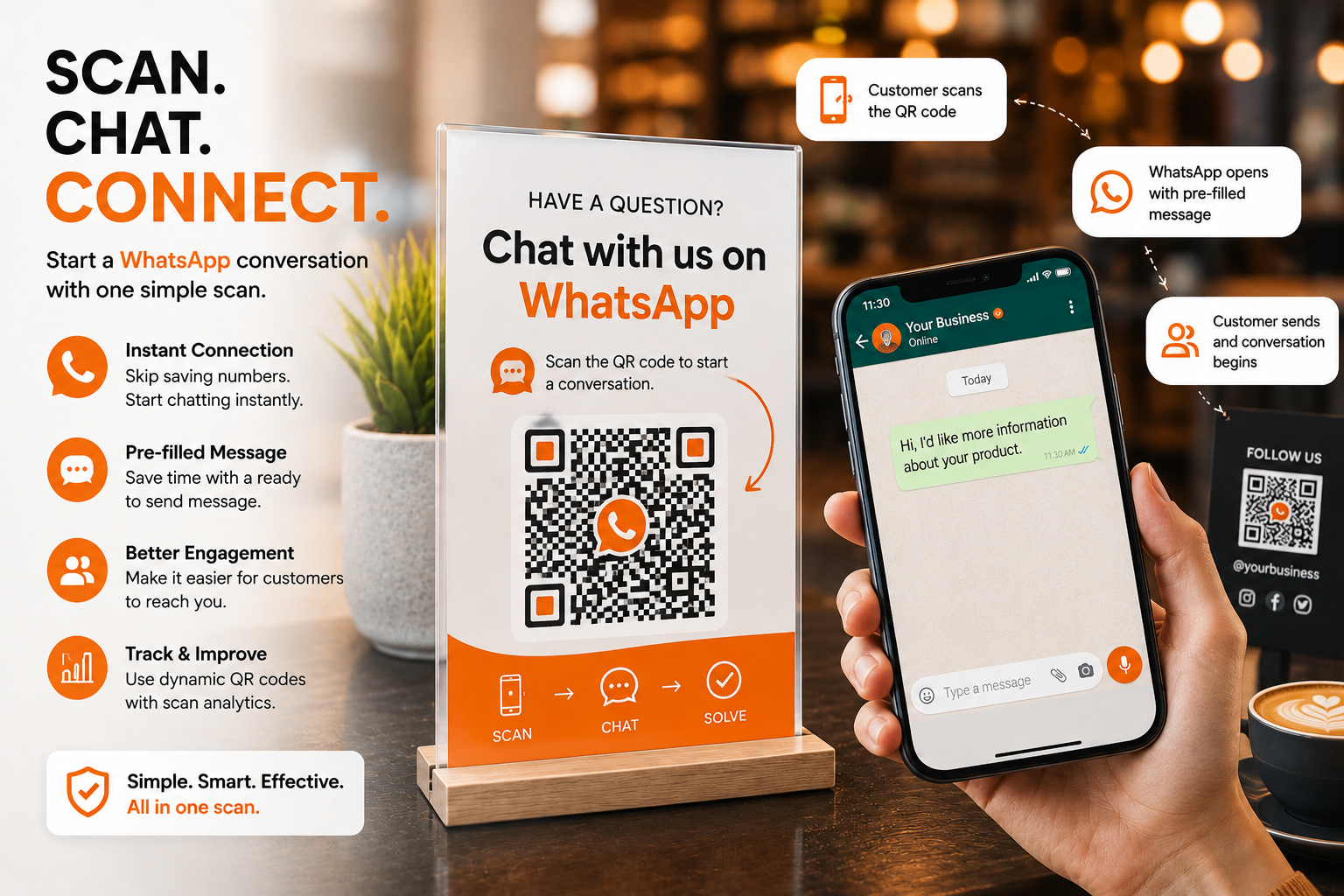
In today’s business environment, customers expect communication to be simple, quick, and convenient. When someone wants to ask about a product, check a service, make an enquiry, request a quotation, or simply learn more about a business, they do not always want to search for a phone number, save it to their contacts, open WhatsApp, and then start a conversation. Every additional step creates a small amount of friction, and when customers are busy, even a small inconvenience can be enough to make them postpone the interaction. A WhatsApp QR Code provides a simple way to remove many of those unnecessary steps. Instead of asking customers to manually enter or save a business number, a QR code can take them directly to a WhatsApp chat. With a suitable pre-filled message, the conversation can even begin with a ready-made enquiry that the customer can review and send. This makes a WhatsApp QR Code more than just a scannable image; it becomes a practical bridge between a physical advertisement, product, business card, menu, storefront, or digital campaign and an actual customer conversation. Spur QR's WhatsApp QR Code solution is designed around this idea, allowing businesses to create QR codes for direct WhatsApp messaging, add optional pre-filled messages, customize the QR design, and use static or dynamic QR options.
What Is a WhatsApp QR Code?
A WhatsApp QR Code is a scannable QR code that helps a customer start a WhatsApp conversation with a business or individual. The concept is simple: instead of displaying only a WhatsApp number and expecting the customer to type it manually, the business displays a QR code that opens the WhatsApp chat experience directly. Spur QR allows users to enter a country code and WhatsApp number, optionally add a pre-filled message, generate the QR code, and then customize its appearance with branding elements such as colors and logos.
This can be particularly useful because WhatsApp is already familiar to many customers. They do not need to understand a complicated new communication system. They simply scan the code, see the WhatsApp conversation, review the information, and continue the interaction. For a business, that means a QR code placed in the right location can turn a passive customer touchpoint into an opportunity for direct communication.
The real value comes from the action behind the scan. A traditional business card might provide a phone number, email address, website, and social media handles, but the customer still has to decide which channel to use and manually take the next step. A WhatsApp QR Code can make one particular action immediately visible: start a WhatsApp conversation. This is especially useful when the business wants enquiries, support requests, sales conversations, reservations, or other customer interactions to happen through WhatsApp.
Why Businesses Are Using WhatsApp QR Codes
Customer communication has changed considerably. People are surrounded by websites, apps, advertisements, social media pages, phone numbers, and online forms. Because there are so many options, businesses need to make their preferred communication channel easy to access. WhatsApp QR Codes can help by connecting the customer directly to a conversation instead of simply giving them information about how to contact the business.
Imagine a customer looking at a property advertisement. The advertisement may include the property price, photographs, location, and agent details. If the customer has to manually save the agent's number before asking a question, the interaction requires several steps. A WhatsApp QR Code can instead provide a clear instruction such as “Scan to Enquire on WhatsApp.” The customer scans, WhatsApp opens, and the enquiry can begin.
The same concept works for restaurants, retailers, service providers, freelancers, real estate professionals, event organizers, and many other businesses. Spur QR specifically lists customer support, restaurant orders, real estate enquiries, freelancer portfolios, and marketing materials among the potential use cases for WhatsApp QR Codes.
The important point is that businesses should not think about a QR code simply as a design element. It should be connected to a specific customer action. When the action is clear, the QR code becomes much more useful.
A WhatsApp QR Code Can Remove the Need to Save a Number
One of the most convenient aspects of a WhatsApp QR Code is that customers can start a chat without first adding the business number to their contacts. Spur QR specifically highlights the ability for users to chat without saving the number first.
This can make a meaningful difference in situations where the customer has a short-term reason to contact a business. Consider someone looking at a promotional poster and wanting to ask about an offer. They may not want to save a number permanently just to ask one question. A QR code provides a more direct route.
The same applies to temporary situations such as events, property enquiries, service requests, restaurant reservations, or product questions. The customer can simply scan and begin the conversation without making contact management another part of the process.
This small improvement can make the customer journey feel more natural because the customer does not have to stop what they are doing to perform a separate contact-saving task.
Pre-Filled WhatsApp Messages Make Enquiries Easier
A particularly useful feature of a WhatsApp QR Code is the ability to create a pre-filled message. Instead of opening an empty conversation, the customer can see a message that has already been prepared. Spur QR's WhatsApp QR Code generator includes an optional pre-filled message field and describes the feature as allowing recipients to open WhatsApp with the message already typed so they can review it and tap Send.
This can be helpful when a business receives many enquiries of a similar type. A real estate agent might use a message such as, “Hi, I am interested in this property and would like more information.” A restaurant could use, “Hi, I would like to make a reservation.” A service company could use, “Hi, I would like to know more about your services.”
The message does not need to contain every possible detail. In fact, keeping it short often creates a more natural experience because the customer can add their own information before sending it.
For businesses, this can also help create more structured conversations. When the customer starts with a clear enquiry, the person receiving the WhatsApp message has an immediate idea about what the customer wants.
Where Can You Use a WhatsApp QR Code?
A WhatsApp QR Code can be placed almost anywhere customers interact with a business. The important factor is not simply visibility but context. The customer should have a reason to scan at the moment they see the code.
For example, a restaurant can place a QR code on a table or promotional display and invite customers to contact the restaurant through WhatsApp. A real estate agent can add one to property advertisements so interested buyers can start a conversation. A freelancer can place it on a portfolio or business card. A retailer can display it near a product to make product enquiries easier. A service business can include it on printed marketing materials so customers can quickly request more information.
Spur QR provides examples including business customer support, restaurant orders, real estate, freelancers, and marketing materials.
The most effective placement is therefore the point where a customer naturally has a question, needs assistance, or is ready to take action.
WhatsApp QR Codes for Customer Support
Customer support is one of the most practical applications of a WhatsApp QR Code. Customers often want quick answers, but finding the correct support number can take time. A QR code can make that contact point easier to reach.
A company could place a QR code on its product packaging with a simple message such as “Need Help? Chat With Us on WhatsApp.” A customer scans the code and begins the conversation. If a pre-filled message is included, the initial interaction can be even more straightforward.
The same approach can be used on invoices, service documents, instruction cards, brochures, or physical counters. Instead of printing a long paragraph explaining how to contact support, a business can provide a clear call to action and a direct digital route.
This can be especially useful for businesses that receive recurring questions. The QR code does not replace good customer service, but it can make the first step easier.
WhatsApp QR Codes for Restaurants
Restaurants can use WhatsApp QR Codes in several different ways. A restaurant may want customers to contact staff about reservations, takeaway orders, catering enquiries, special requests, or event bookings. A QR code can make these interactions easier to start.
For example, a promotional card could say:“Planning a Celebration? Scan to Chat With Us on WhatsApp.”
The customer scans the code and sees a prepared message asking about event arrangements. The customer can then add the date, number of guests, or other details.
Spur QR specifically lists restaurant orders and reservations as a WhatsApp QR Code use case.
The benefit is not limited to customers sitting inside a restaurant. A QR code can also appear on takeaway packaging, menus, flyers, advertisements, or event promotions, creating another way for customers to reach the restaurant.
WhatsApp QR Codes for Real Estate
Real estate is a strong example of a business where quick communication can matter. Property advertisements often provide many details, but interested buyers or tenants usually have additional questions. They may want to know about availability, price, location, amenities, viewing times, or other information.
A WhatsApp QR Code can be placed directly on a property listing or printed advertisement with a call to action such as “Interested in This Property? Scan to Chat.” Spur QR specifically identifies real estate agents as a use case, including placing QR codes on property listings so prospects can start a chat.
This creates a more direct connection between the property being advertised and the person handling enquiries. Instead of separating the advertisement from the communication process, the QR code connects them.
WhatsApp QR Codes for Freelancers and Professionals
Freelancers, consultants, designers, photographers, developers, trainers, and other independent professionals often rely on personal communication to convert enquiries into projects. A website or portfolio can demonstrate their work, but potential clients may still need a quick way to ask questions.
A WhatsApp QR Code can be added to a digital or printed business card, portfolio, presentation, brochure, or professional profile. Spur QR specifically suggests adding WhatsApp QR Codes to portfolios or business cards so clients can reach freelancers in one scan.
This can be particularly useful when networking. Instead of exchanging numbers manually, a professional can show a QR code and allow the other person to start a WhatsApp conversation immediately.
WhatsApp QR Codes on Marketing Materials
Printed marketing does not have to remain disconnected from digital communication. A flyer, poster, brochure, banner, newspaper advertisement, product display, or packaging can include a WhatsApp QR Code that gives the viewer an immediate digital action.
A strong marketing message might say:“Have Questions? Scan to Chat.”
Or:“Want More Details? Message Us on WhatsApp.”
This is more actionable than simply displaying a WhatsApp icon without explaining what the customer should do.
A business can also use different QR codes for different campaigns or placements. Spur QR's broader QR platform supports dynamic QR codes and scan analytics for business and marketing applications, allowing campaigns to be managed and measured more effectively.
This makes QR technology useful not only as a communication tool but also as part of a broader marketing strategy.
Static vs Dynamic WhatsApp QR Codes
When creating a WhatsApp QR Code, businesses should consider whether a static or dynamic QR code is more appropriate. A static QR code contains fixed information and is useful when the destination details are not expected to change. Spur QR states that static WhatsApp QR Codes can be generated without an account.
Dynamic QR Codes provide additional flexibility. Spur QR's WhatsApp page explains that dynamic QR codes can allow the number or message to be updated after the code has been printed, with login required.
This difference becomes important when QR codes are printed in large quantities. A business that expects its communication details or campaigns to change may benefit from a dynamic option because the physical QR code can remain in place while its associated information is updated.
For a simple permanent contact point, a static QR code may be enough. For campaigns, printed materials, or situations where flexibility and measurement matter, a dynamic QR code can provide greater control.
Branded WhatsApp QR Codes Look More Professional
A QR code should be easy to recognize and easy to scan, but that does not mean it has to look completely disconnected from the business's visual identity. Spur QR provides customization options for patterns, corner styles, foreground and background colors, gradients, and logos.
Branding can help a QR code fit naturally into marketing materials. A business can use its brand colors, incorporate its logo, and create a visual style that matches its other communication.
However, design should always support functionality. A QR code that looks attractive but is difficult to scan does not provide a good customer experience. The code should have sufficient contrast, appropriate spacing, and enough size for the intended environment.
Simple Ways to Make a WhatsApp QR Code More Effective
The best WhatsApp QR Code campaigns usually focus on clarity rather than complexity. Customers should immediately understand what will happen when they scan. A short call to action can make the purpose obvious.
Businesses should also test the QR code before printing it on large quantities of materials. The phone number, country code, pre-filled message, and final destination should all be checked carefully.
A few practical principles can make a difference:
- Give the QR code one clear purpose: tell customers whether they are scanning to enquire, order, book, ask for support, or request information.
- Keep the surrounding message simple: use a short call to action and make the QR code large and visible enough to scan comfortably.
These details may seem small, but they influence whether the customer understands the action and feels comfortable taking it.
QR Codes Can Turn Physical Touchpoints Into Conversations
One of the most useful ideas behind WhatsApp QR Codes is the connection between offline and online experiences. A customer may first discover a business through a physical object: a business card, package, poster, menu, storefront, brochure, or event display. Traditionally, that physical experience ends when the customer walks away.
A WhatsApp QR Code changes that. The physical material can provide a direct route into a digital conversation. The customer can move from seeing a product or service to communicating with the business without needing to remember information for later.
This is why QR codes are becoming useful in customer journeys. They do not replace the physical experience; they extend it.
How to Create a WhatsApp QR Code With Spur QR
Creating a WhatsApp QR Code with Spur QR follows a straightforward process. According to the platform, users begin by entering their country code and WhatsApp number, optionally add a pre-filled message, and select Generate QR. The resulting QR code can then be customized with colors, patterns, corner styles, and a logo before being downloaded and used on materials such as business cards, menus, or advertisements.
The basic process is:Enter WhatsApp number → Add optional message → Generate QR → Customize → Download → Test → Publish.
For businesses that need more flexibility, the platform also provides dynamic QR support, which can allow the number or message to be updated after printing.
Why the Right Call to Action Matters
Even the best QR code can be ignored if customers do not understand why they should scan it. A QR code needs a reason. Instead of placing a code next to the word “WhatsApp,” explain the benefit.
For example:
- Scan to Chat With Us
- Scan to Ask About This Product
- Scan to Request a Quote
- Scan to Book on WhatsApp
- Scan to Get Customer Support
- Scan to Enquire About This Property
The call to action should match the actual purpose of the WhatsApp conversation. When the message and destination are aligned, the customer experience feels more natural.
The Future of Direct Customer Communication
Businesses are constantly looking for ways to make communication faster without making the customer journey complicated. WhatsApp QR Codes fit naturally into this goal because they connect a physical or digital touchpoint with a familiar messaging channel.
The technology itself is simple, but its applications can be broad. A QR code can sit on a business card, product package, restaurant table, property advertisement, promotional poster, event display, or service document. Wherever the customer has a reason to communicate, the QR code can provide a direct path.
The future of QR marketing is therefore not only about getting more scans. It is about making those scans meaningful. A customer who scans because they have a genuine question, enquiry, or request is starting a conversation that can potentially lead to a sale, booking, service interaction, or long-term relationship.
Final Thoughts
A WhatsApp QR Code gives businesses a simple way to make direct communication more accessible. Instead of asking customers to type a number, save a contact, search for a business, and then begin a conversation, businesses can place a clear scan-to-chat option exactly where the customer is already making a decision.
With features such as pre-filled messages, no-number-saving communication, branded customization, static QR generation, and dynamic QR support, Spur QR provides businesses with a practical way to create WhatsApp QR experiences for different situations.
The most important part, however, is not the QR pattern or its design. It is the experience surrounding it. A customer should know why they are scanning, what will happen next, and what they can expect from the conversation. When those elements are clear, a simple QR code can become a useful communication bridge between a business and its customers.
Whether it is printed on a business card, displayed at a restaurant, added to a property listing, placed on product packaging, included in an advertisement, or used at an event, the idea remains the same: make it easier for interested customers to start the conversation.
And sometimes, that is all a business needs to turn a moment of interest into a real customer interaction.