Table of Contents
- WiFi QR Codes: Make Internet Access Simple for Every Guest
- What Is a WiFi QR Code?
- Why Typing WiFi Passwords Can Be a Problem
- How Does a WiFi QR Code Work?
- WiFi Access Without Revealing the Password
- WiFi QR Codes for Cafés and Restaurants
- WiFi QR Codes for Hotels
- WiFi QR Codes for Offices
- WiFi QR Codes for Events
- WiFi QR Codes for Retail Stores
- Create a WiFi QR Code in a Few Simple Steps
- Make the WiFi QR Code Match Your Brand
- Static and Dynamic WiFi QR Codes
- What Makes a Good WiFi QR Code Display?
- Where Should You Place a WiFi QR Code?
- WiFi QR Codes Are Useful Beyond Convenience
- Why WiFi QR Codes Fit Modern Business Environments
- Final Thoughts
WiFi QR Codes: Make Internet Access Simple for Every Guest
Think about the last time someone visited your home, office, café, hotel, or business and asked, “What’s the WiFi password?” Usually, the answer is followed by another small problem: the password is long, contains capital letters and numbers, or is simply difficult to type correctly. The guest tries once, makes a mistake, tries again, and eventually someone has to read the password aloud or type it into the visitor’s phone. It is a very ordinary situation, but it is also a good example of how a small amount of friction can make an otherwise simple experience unnecessarily difficult.
A WiFi QR Code offers a much easier approach. Instead of manually entering a network name and password, a guest can scan a QR code with a compatible smartphone and connect to the WiFi network. This makes WiFi sharing quicker and more convenient while giving businesses a simple way to improve the experience they provide to customers and visitors. Spur QR's WiFi QR Code tool is designed specifically for this purpose, allowing users to enter their WiFi details, choose the security type, generate a QR code, customize its appearance, and display it wherever guests need internet access.
What Is a WiFi QR Code?
A WiFi QR Code is a QR code that contains the information needed to connect a device to a wireless network. Instead of asking someone to manually type the WiFi network name and password, the information can be encoded into the QR code. When a compatible smartphone scans the code, the device can use that information to begin the connection process. The idea is straightforward, but its practical value is significant because WiFi access is something people frequently need when entering a new environment.
For a business, this can be especially useful because visitors often expect internet access without wanting to spend time asking staff for credentials. A customer sitting in a café may want to work for an hour. A hotel guest may want to connect their phone as soon as they enter their room. A visitor arriving at an office may need internet access while waiting for a meeting. Someone attending a conference may need to get online quickly to access event information or communicate with colleagues. In each situation, the goal is the same: connect without unnecessary steps.
Spur QR describes its WiFi QR Code as a way to connect to WiFi without typing passwords and supports common network security options including WPA, WEP, and open networks. The platform also states that its WiFi QR codes work with iPhone and Android devices where the native camera supports QR scanning.
Why Typing WiFi Passwords Can Be a Problem
WiFi passwords are often designed to be difficult to guess, which is useful for network security but not always convenient for sharing. A strong password might contain a mixture of uppercase letters, lowercase letters, numbers, and special characters. When someone has to type that password manually on a small smartphone keyboard, mistakes become easy to make.
There is also a communication problem. Imagine a restaurant employee giving a customer a password verbally. The customer may hear one character incorrectly. In an office, a receptionist may need to repeat the password several times during a busy day. In a hotel, guests may have to contact reception simply because they cannot find or correctly enter the WiFi credentials. These are small interruptions, but they add up.
A WiFi QR Code changes the interaction from “Here is the password; type it carefully” to “Scan here to connect.” That difference makes the experience feel much more modern and convenient.
The QR code does not need to be complicated. It can be printed on a small card, displayed on a table, placed near a reception desk, added to a hotel information folder, or positioned on a sign where visitors can easily see it.
How Does a WiFi QR Code Work?
The process behind a WiFi QR Code is relatively simple. First, the WiFi network details are entered into the QR generator. These details generally include the network name, also known as the SSID, the password, and the network's security type. The information is then encoded into a QR pattern.
Spur QR's WiFi QR Code generator follows a simple workflow: users enter the WiFi SSID and password, select the appropriate security type, and generate the QR code. The available security choices include WPA, WEP, and Open. After generation, the QR code can be customized and downloaded for use.
Once the QR code is displayed, a guest can point a compatible smartphone camera toward it. The device reads the encoded information and can offer the option to connect to the network. This removes the need to manually type the credentials.
The most important part is that the QR code becomes the communication point between the physical environment and the digital network. The customer does not need to understand the technical information behind the connection. They simply scan and follow the connection prompt.
WiFi Access Without Revealing the Password
Another useful advantage of a WiFi QR Code is that guests can connect without needing to be verbally told the password. Spur QR specifically highlights this as a feature of its WiFi QR Code solution, describing it as allowing guests to connect without seeing or knowing the password.
This can be useful in places where staff regularly provide internet access to visitors. Rather than repeatedly sharing the credentials, a business can display the QR code in an appropriate location.
For example, a hotel could place the code inside a guest information folder. A café could display it on each table. An office could place a visitor WiFi QR code at reception. An event organizer could display it near registration. The visitor gets the access they need while staff do not have to repeat the password throughout the day.
This does not mean businesses should ignore network security. It is still important to use an appropriate guest network and apply sensible access controls. The QR code simply makes the process of sharing the intended WiFi access more convenient.
WiFi QR Codes for Cafés and Restaurants
Cafés and restaurants are among the most natural places to use WiFi QR Codes. Customers may spend significant time at their tables, particularly in cafés where people work, study, meet clients, or simply relax. Asking staff for the WiFi password can interrupt both customers and employees.
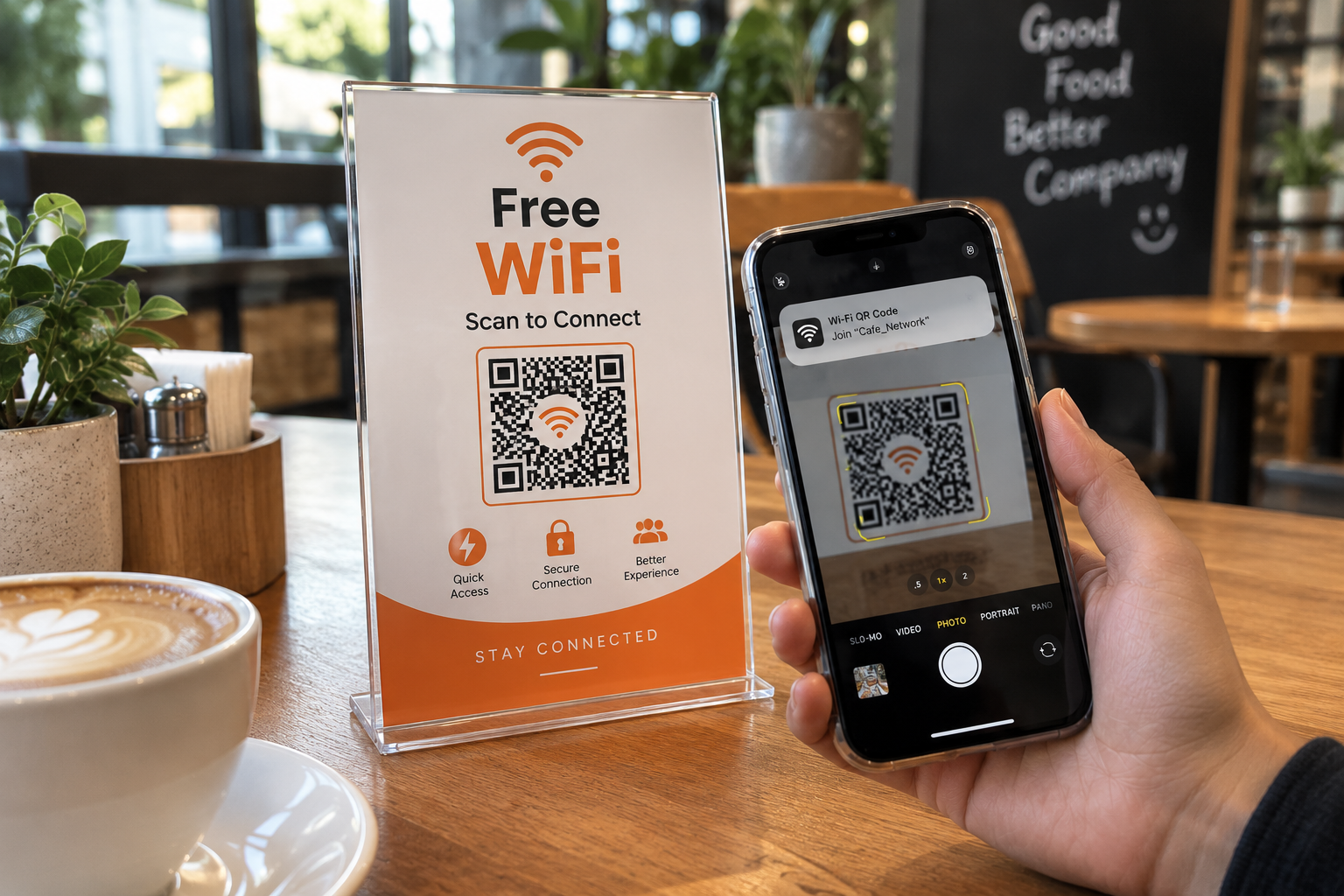
A small table display can solve the problem. Instead of a customer asking, “What is the WiFi password?”, the table can simply include a message such as:
The customer scans the code and can proceed with the connection process. Spur QR specifically suggests placing WiFi QR codes on tables to replace the repeated need to ask for WiFi passwords.
This is a simple improvement, but it can make the environment feel more organized. Staff can focus on serving customers instead of repeatedly providing network details, while customers get a faster way to connect.
WiFi QR Codes for Hotels
Hotels have another strong use case because guests often expect WiFi access immediately after checking in. A guest may arrive after a long journey and want to connect their phone, contact family, check work messages, or access travel information. Having to call reception for the password can feel unnecessary.
A WiFi QR Code can be included in the room information area, welcome folder, reception display, or another suitable location. Spur QR specifically recommends placing WiFi QR codes in hotel rooms so guests can connect without needing to call the front desk.
The concept can also be extended to guest-facing areas such as lounges and waiting spaces. A clear QR code with a short instruction can make internet access feel like a built-in part of the hospitality experience.
WiFi QR Codes for Offices
In an office environment, visitors may need temporary internet access while attending meetings, interviews, presentations, or appointments. Employees may already know the network credentials, but visitors usually do not.
A visitor WiFi QR Code can provide a more convenient solution. Instead of asking the receptionist or employee to type the credentials, the visitor can scan the code and connect to the designated guest network.
This can be especially helpful for businesses that receive visitors regularly. The QR code can remain in a fixed location while employees avoid repeatedly handling WiFi access requests.
The key is to use the QR code for the intended visitor or guest network rather than unnecessarily exposing access to an internal business network.
WiFi QR Codes for Events
Large gatherings can create another WiFi access challenge. Conferences, exhibitions, workshops, seminars, and networking events may have dozens or hundreds of attendees trying to connect around the same time.
A WiFi QR Code can be displayed at registration counters, entrance areas, information desks, presentation areas, or event signage. Spur QR identifies events and exhibitions as suitable use cases for displaying a WiFi QR code for attendee connectivity.
For event organizers, this can reduce repetitive questions from attendees. Instead of answering the same WiFi question throughout the event, organizers can make the connection information visible and easy to access.
WiFi QR Codes for Retail Stores
Retail businesses can also use WiFi QR Codes as part of the customer experience. A store may offer free WiFi to customers who spend time browsing products, comparing options, or waiting for services.
Spur QR lists retail stores as a use case and notes that offering free WiFi can encourage shoppers to spend more time in the store.
The QR code can be positioned near a customer service desk, waiting area, entrance, or another visible location. A simple instruction such as “Free WiFi — Scan to Connect” is enough to communicate the purpose.
The important thing is not to overwhelm customers with unnecessary instructions. The easier the experience looks, the more likely people are to use it.
Create a WiFi QR Code in a Few Simple Steps
One of the advantages of using a dedicated WiFi QR generator is that you do not have to manually create the QR structure yourself. The generator handles the encoding process.
With Spur QR, the basic process is:
- Enter your WiFi network name and password, then choose the correct security type such as WPA, WEP, or Open.
- Generate and customize the QR code, then download and place it where guests need internet access.
The platform also allows users to customize the QR design with different dot patterns, corner styles, foreground and background colors, gradients, and logos.
This means a business does not necessarily have to display a plain black-and-white QR code. It can create a design that fits its existing visual identity while keeping the code recognizable and usable.
Make the WiFi QR Code Match Your Brand
Businesses often pay attention to their menus, signage, packaging, interiors, websites, and social media, so a QR code should not necessarily look like an unrelated technical object placed in the middle of the customer experience.
Spur QR provides options for custom foreground and background colors, gradients, patterns, corner styles, and logo uploads. This gives businesses an opportunity to create a WiFi QR Code that feels like part of their overall branding.
For example, a hotel can place a branded QR code inside its room information card. A café can incorporate its visual identity into a tabletop WiFi display. An office can use company branding on its visitor WiFi sign.
However, design should always come after usability. A QR code should have sufficient contrast and remain easy to scan. A beautiful QR code that does not scan reliably is not useful.
Static and Dynamic WiFi QR Codes
Businesses should also understand the difference between static and dynamic QR codes when deciding how to manage their WiFi information. A static QR code contains fixed information, while a dynamic QR code can provide greater flexibility depending on the use case.
Spur QR's WiFi tool offers both static and dynamic QR options. The site explains that dynamic QR codes require login and can provide benefits such as updating information without changing the physical QR image.
This can matter for businesses that print QR codes on materials used for a long period. If the underlying information needs to change, a dynamic solution can be more flexible than printing a completely new code.
For a simple home WiFi card or a permanent guest network, a static QR code may be sufficient. For businesses managing changing information and wanting more control, dynamic QR technology can be worth considering.
What Makes a Good WiFi QR Code Display?
Generating the QR code is only the first step. The way it is presented also matters. A guest should immediately understand what the QR code is for. A QR code sitting alone on a wall may not communicate enough information.
A short instruction can solve this:
- Scan to Connect to WiFi
- Free WiFi — Scan Here
- Guest WiFi — Scan to Connect
- Connect to Our WiFi in One Scan
The message should be short, readable, and placed close to the QR code.
Businesses should also test the QR code before putting it into regular use. Test it from the actual distance at which customers will scan it and, where possible, check it with different smartphones. Spur QR recommends testing customized QR codes on multiple devices before large-scale distribution.
Where Should You Place a WiFi QR Code?
Placement depends on the environment and the customer journey. The best location is usually somewhere visitors naturally look when they need internet access.
Some practical locations include:
- Reception desks
- Restaurant and café tables
- Hotel rooms
- Waiting areas
- Conference registration counters
- Event information boards
- Retail customer service areas
- Office visitor desks
The goal is to make the QR code visible at the exact moment someone wants to connect.For example, placing a WiFi QR code behind a counter where customers cannot see it is less useful than putting it directly on the table where they are sitting. Good placement removes another form of friction.
WiFi QR Codes Are Useful Beyond Convenience
At first, a WiFi QR Code may seem like a very small technology improvement. After all, connecting to WiFi manually is not particularly difficult. But businesses are made up of hundreds of small customer interactions, and improving these interactions can contribute to a smoother overall experience.
A guest who connects quickly does not need to ask an employee for help. A hotel guest does not have to call reception. A restaurant customer does not have to wait for staff to provide a password. An event attendee does not have to search through printed information for network credentials.
The QR code therefore works quietly in the background. It removes a small obstacle and allows the customer to continue with what they actually came to do.
Why WiFi QR Codes Fit Modern Business Environments
Modern businesses increasingly use QR codes to connect physical experiences with digital actions. A customer can scan a code to open a website, access a menu, view product information, share feedback, contact a business, or connect to WiFi. Spur QR provides a broad range of QR code types alongside its WiFi solution, including website, file, location, WhatsApp, phone, feedback, menu, event, and product QR codes.
WiFi is a particularly practical application because internet access is often an immediate need. There is no need to convince a customer that they should scan for some future benefit. They are already looking for a connection, and the QR code simply gives them a convenient way to get it.
That makes WiFi QR Codes a useful example of technology that works best when it solves a real problem rather than being added simply because it looks modern.
Final Thoughts
A WiFi QR Code turns a common everyday task into a much simpler experience. Instead of repeatedly sharing long passwords, asking guests to type network details, or requiring visitors to contact staff for internet access, businesses can provide a clear scan-to-connect option.
From cafés and restaurants to hotels, offices, retail stores, homes, and events, the use cases are broad. Spur QR supports WiFi networks using WPA, WEP, and Open security types, provides static and dynamic QR options, supports customization with colors and logos, and is designed to work with compatible iPhone and Android devices.
The real value of a WiFi QR Code is not the QR pattern itself. It is the simpler experience that comes with it. When a customer can walk into a space, see a clear “Scan to Connect” message, scan the code, and get online without unnecessary typing or repeated questions, the technology is doing exactly what it should do: making something simple even simpler.
Whether you are managing a café, hotel, office, retail store, event, or simply sharing your home network with guests, a well-designed WiFi QR Code can be a small but meaningful improvement to the way people access the internet.